
ThreadX docsThreadX docs
ThreadX
ThreadX Modules
NetX Duo
FileX
GUIX
USBX
TraceX
LevelX
ThreadX
ThreadX Modules
NetX Duo
FileX
GUIX
USBX
TraceX
LevelX
  • NetX Duo Documentation

    • Understand NetX Duo
    • NetX Duo documentation
    • Chapter 1 - Introduction to NetX Duo
    • Chapter 2 - Installation and Use of NetX Duo
    • Chapter 3 - Functional Components of NetX Duo
    • Chapter 4 - Description of NetX Duo Services
    • Chapter 5 - NetX Duo Network Drivers
    • Appendix A - NetX Duo Services
    • Appendix B - NetX Duo Constants
    • Appendix C - NetX Duo Data Types
    • Appendix D - NetX Duo BSD-Compatible Socket API
    • Appendix E - NetX Duo ASCII Character Codes
    • Auto-IP

      • Chapter 1 - Introduction to NetX Duo AutoIP
      • Chapter 2 - Installation and use of NetX Duo AutoIP
      • Chapter 3 - Description of NetX Duo AutoIP services
    • BSD

      • Chapter 1 - Introduction to NetX Duo BSD
      • Chapter 2 - Installation and use of NetX Duo BSD
      • Chapter 3 - NetX Duo BSD Services
    • Crypto

      • Chapter 1 - Introduction to NetX Duo Crypto
      • Chapter 2 - Installation and use of NetX Duo Crypto
      • Chapter 3 - Functional description of NetX Duo Crypto
      • Chapter 4 - NetX Duo Crypto API description
      • Appendix - NetX Duo Crypto CAVS test
    • DHCP Client

      • Chapter 1 - Introduction to the NetX Duo DHCP Client
      • Chapter 2 - Installation and use of NetX Duo DHCP Client
      • Chapter 3 - Description of NetX Duo DHCP Client services
      • Appendix A - Description of the Restore state feature for NetX Duo DHCP Client services
    • DHCP Server

      • Chapter 1 - Introduction to NetX Duo DHCP Server
      • Chapter 2 - Installation and Use of the NetX Duo DHCP Server
      • Chapter 3 - Description of NetX Duo DHCP server services
    • DHCPv6 Client

      • Chapter 1 - Introduction to NetX Duo DHCPv6 Client
      • Chapter 2 - Installation and use of NetX Duo DHCPv6 Client
      • Chapter 3 - NetX Duo DHCPv6 configuration options
      • Chapter 4 - NetX Duo DHCPv6 Client services
      • Appendix A - Description of the Restore State Feature for NetX Duo DHCPv6 Client
    • DHCPv6 Server

      • Chapter 1 - Introduction to NetX Duo DHCPv6 server
      • Chapter 2 - Installation and use of NetX Duo DHCPv6 server
      • Chapter 3 - NetX Duo DHCPv6 server configuration options
      • Chapter 4 - NetX Duo DHCPv6 server services
      • Appendix A – NetX Duo DHCPv6 option codes
      • Appendix B - NetX Duo DHCPv6 server status codes
      • Appendix C - NetX Duo DHCPv6 unique identifiers (DUIDs)
      • Appendix D - NetX Duo Advanced DHCPv6 server example
    • DNS

      • Chapter 1 - Introduction to the NetX Duo DNS Client
      • Chapter 2 - Installation and Use of NetX Duo DNS Client
      • Chapter 3 - Description of NetX Duo DNS Client Services
    • FTP

      • Chapter 1 - Introduction to NetX Duo FTP
      • Chapter 2 - Installation and use of FTP
      • Chapter 3 - Description of FTP services
    • HTTP

      • Chapter 1 - Introduction to NetX Duo HTTP
      • Chapter 2 - Installation and Use of NetX Duo HTTP
      • Chapter 3 - Description of NetX Duo HTTP Services
    • iperf

      • Chapter 1 - Introduction to NetX Duo Iperf
      • Chapter 2 - Installing and using NetX Duo Iperf
      • Chapter 3 - Running the UDP Transmit Test
    • mDNS

      • Chapter 1 - Introduction to NetX Duo mDNS/DNS-SD
      • Chapter 2 - Installation and use of mDNS
      • Chapter 3 - Description of internal service cache
      • Chapter 4 - Description of mDNS services
    • mqtt

      • Chapter 1 - Introduction to NetX Duo MQTT
      • Chapter 2 - Installation and use of NetX Duo MQTT client
      • Chapter 3 - Description of NetX Duo MQTT Client Services
    • NAT

      • Chapter 1 - An introduction to Network Address Translation
      • Chapter 2 - Installation and use of NAT
      • Chapter 3 - NAT configuration options
      • Chapter 4 - Description of NAT services
    • POP3 Client

      • Chapter 1 - Introduction to NetX Duo POP3
      • Chapter 2 - Installation and use of NetX Duo POP3 Client
      • Chapter 3 - Description of POP3 Client services
    • PPP

      • Chapter 1 - Introduction to the NetX Duo Point-to-Point Protocol (PPP)
      • Chapter 2 - Installation and use of NetX Duo Point-to-Point Protocol (PPP)
      • Chapter 3 - Description of NetX Duo Point-to-Point Protocol (PPP) services
    • PTP Client

      • Chapter 1 - Introduction to NetX Duo PTP Client
      • Chapter 2 - Installation and Use of NetX Duo PTP Client
      • Chapter 3 - Description of NetX Duo PTP Client Services
    • rtp

      • Chapter 1 - Introduction to the NetX Duo RTP Sender
      • Chapter 2 - Installation and use of NetX Duo RTP Sender
      • Chapter 3 - Description of NetX Duo RTP Sender Services
    • rtsp

      • Chapter 1 - Introduction to the NetX Duo RTSP Server
      • Chapter 2 - Installation and use of NetX Duo RTSP Server
      • Chapter 3 - Description of NetX Duo RTSP Server Services
    • Secure DTLS

      • Chapter 1 - Introduction to NetX Duo Secure DTLS
      • Chapter 2 - Installation and use of NetX Duo Secure DTLS
      • Chapter 3 - Functional description of NetX Duo Secure DTLS
      • Chapter 4 - Description of NetX Duo Secure DTLS services
      • Appendix A - NetX Duo Secure DTLS return/error codes
    • Secure TLS

      • Chapter 1 - Introduction to NetX Duo Secure
      • Chapter 2 - Installation and use of NetX Duo Secure
      • Chapter 3 - Functional description of NetX Duo Secure
      • Chapter 4 - Description of NetX Duo Secure services
      • Appendix A - NetX Duo Secure return/error codes
    • SMTP Client

      • Chapter 1 - Introduction to NetX Duo SMTP client
      • Chapter 2 - Installation and use of NetX Duo SMTP client
      • Chapter 3 - Client description of SMTP Client services
    • snmp

      • Chapter 1 - Introduction to NetX Duo SNMP
      • Chapter 2 - Installation and use of the NetX Duo SNMP agent
      • Chapter 3 - Description of NetX Duo SNMP agent services
    • sntp client

      • Chapter 1 - Introduction to NetX Duo SNTP
      • Chapter 2 - Installation and Use of NetX Duo SNTP Client
      • Chapter 3 - Description of NetX Duo SNTP Client Services
      • Appendix A - NetX Duo SNTP Fatal Error Codes
    • telnet

      • Chapter 1 - Introduction to NetX Duo Telnet
      • Chapter 2 - Installation and use of NetX Duo Telnet
      • Chapter 3 - Description of NetX Duo Telnet services
    • TFTP

      • Chapter 1 - Introduction to NetX Duo TFTP
      • Chapter 2 - Installation and use of NetX Duo TFTP
      • Chapter 3 - Description of NetX Duo TFTP services
    • Web HTTP

      • Chapter 1 - Introduction to HTTP and HTTPS
      • Chapter 2 - Installation and use of HTTP and HTTPS
      • Chapter 3 - Description of HTTP services
    • About the NetX Duo User Guide

Chapter 2 Installation and Use

This chapter contains a description of various issues related to installation, setup, and usage of the NetX Duo Iperf Demonstration.

Installing the Demonstration

Please follow the platform specific installation instructions supplied in the distribution.

Installing Iperf

There is a variety of Iperf programs that you may use. However, the examples in this document are based on the Java-based Jperf 2.0.2, which is available from multiple sources on the Internet.

Note: Jperf requires that Java is installed on the host machine.

Setting the IP Address

By default, the IP address the NetX Duo Iperf Demonstration is set to 192.2.2.149. This is setup in the file demo_netx_duo_iperf.c as a parameter to the call to nx_ip_create.

Network Assumptions

This demonstration assumes that the Iperf host machine and the target board running the NetX Duo Iperf Demonstration are connected to a 100Mbps full-duplex Ethernet switch. To achieve best performance, there should be no other traffic on the test network.

It is also possible to connect the Iperf host and the NetX Duo target board back-to-back with a cross-over Ethernet cable.

Running the Demonstration

Running the demonstration is easy; simply load, build and execute the NetX Duo Iperf Demonstration project -- typically named demo_netx_duo_iperf.

Browse to the Demonstration

Browse to the target board via a browser on the Iperf host platform. Assuming the target board IP address of 192.2.2.149, the following is an example of the NetX Duo Iperf Demonstration initial web page.
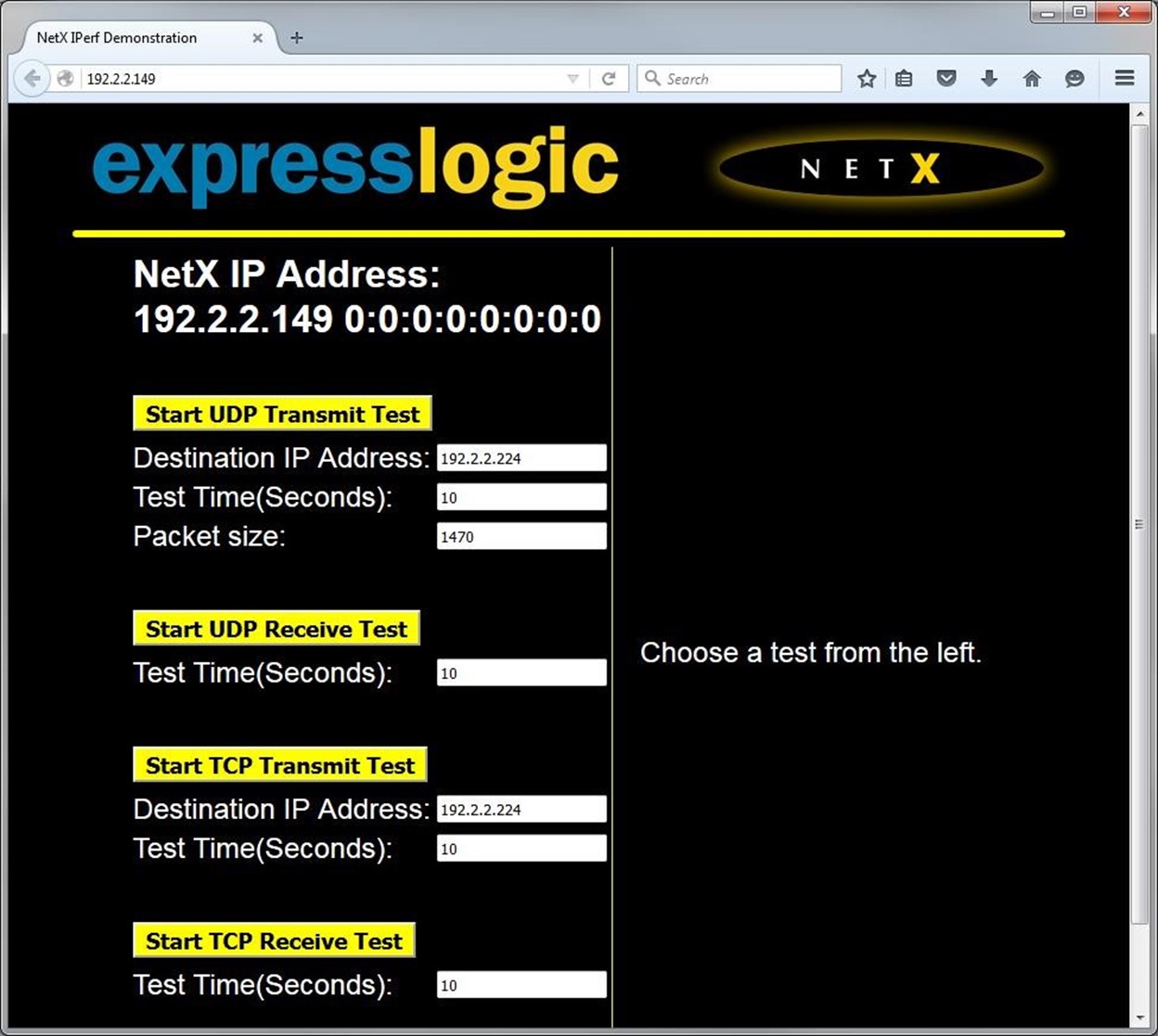
An example of the Iperf initial web page

Running Jperf

Running Jperf is easy, simply double-click on the Windows batch file jperf.bat. This launches the Jperf IDE, as shown below. Once the Jperf IDE is displayed, the Server Address field must be set to the IP address of the NetX Duo Iperf Demonstration target board. In this example, the NetX Duo target board IP address is 192.2.2.149. Also worth noting are the UDP Bandwidth and UDP Packet Size fields. These need to be set up for optimal UDP receive performance, as shown below.
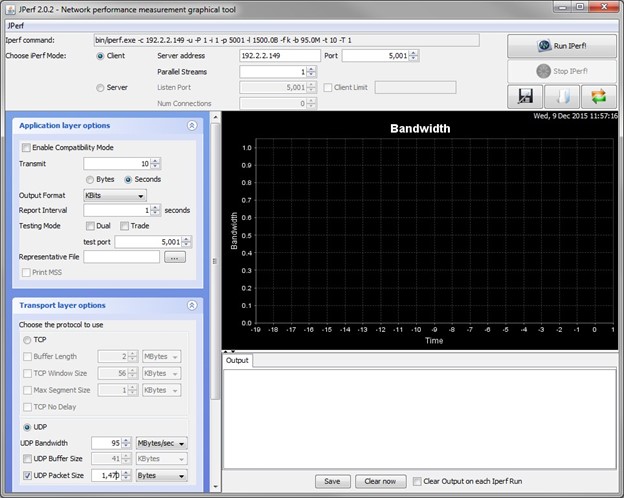
Optimizing the UDP performance.

Prev
Chapter 1 - Introduction to NetX Duo Iperf
Next
Chapter 3 - Running the UDP Transmit Test