
Chapter 1 - Introduction to NetX Duo SNMP
The Simple Network Management Protocol (SNMP) is a protocol designed for managing devices on the internet. SNMP is a protocol that utilizes the connectionless User Datagram Protocol (UDP) services to perform its management function. The NetX Duo SNMP implementation is that of an SNMP Agent. An agent is responsible for responding to SNMP Manager's commands and sending event driven traps.
NetX Duo SNMP supports both IPv4 and IPv6 communication with SNMP Managers. NetX SNMP applications should compile and run in NetX Duo SNMP. However, the developer is encouraged to port existing SNMP applications to using the equivalent "duo" services. For example, when sending SNMP trap messages, the following 'duo' services should replace their NetX equivalent:
nxd_snmp_object_trap_send
nxd_snmp_object_trapv2_send
nxd_snmp_object_trapv3_send
For more details, see Description of SNMP Agent Services elsewhere in this User Guide for more details.
NetX Duo SNMP Agent Requirements
The NetX Duo SNMP package requires that an IP instance has already been created. In addition, UDP must be enabled on that same IP instance.
The NetX Duo SNMP Agent has several additional requirements. First, it requires access to port 161 for handling all SNMP manager requests. It also requires access to port 162 for sending trap messages to the Manager.
To use NetX Duo SNMP Agent with over IPv6 and to obtain IPv6 objects, IPv6 must be enabled in NetX Duo. See the NetX Duo User Guide for details on enabling the IP instance for IPv6 services.
NetX Duo SNMP Constraints
The NetX Duo SNMP protocol implements SNMP Version 1, 2, and 3. The SNMPv3 implementation supports MD5 and SHA authentication, and DES encryption. This version of the NetX Duo SNMP Agent has the following constraints:
- One SNMP Agent per NetX Duo IP Instance
- No support for RMON
- SNMP v3 Inform messages are not supported
- OPAQUE and NSAP data types are not supported
- IPv6 addresses are defined as octet strings, and format checking is left to the application.
SNMP Object Names
The SNMP protocol is designed to manage devices on the internet. To accomplish this, each SNMP managed device has a set of objects that are defined by the Structure of Management Information (SMI) as defined by RFC 1155. The structure is a hierarchical tree type of structure that looks like the following:
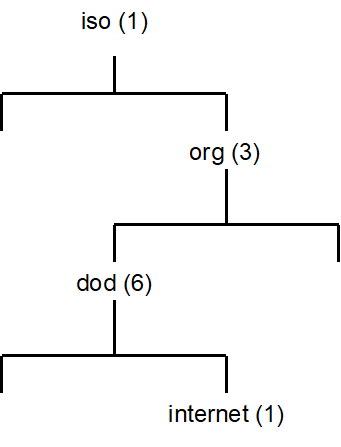
Each node in the tree is an object. The "dod" object in the tree is identified by the notation 1.3.6, while the "internet" object in the tree is identified by the notation 1.3.6.1. All SNMP object names begin with the notation 1.3.6.
An SNMP Manager uses this object notation to specify what object in the device it wishes to get or set. The NetX Duo SNMP Agent interprets such manager requests and provides mechanisms for the application to perform the requested operation.
SNMP Manager Requests
The SNMP has a simple mechanism for managing devices. There is a set of standard SNMP commands that are issued by the SNMP Manager to the SNMP device on port 161. The following shows some of the basic SNMP Manager commands:
| SNMP Command | Meaning |
|---|---|
| GET | Get the specified object |
| GETNEXT | Get the next logical object after the specified object ID |
| GETBULK | Get the multiple logical objects after the specified object ID |
| SET | Set the specified object |
These commands are encoded in the Abstract Syntax Notation One (ASN.1) format and reside in the payload of the UDP packet sent by the SNMP Manager. The NetX Duo SNMP Agent processes the request and then calls the corresponding handling routine specified in the nx_snmp_agent_create call.
NetX Duo SNMP Agent Traps
The NetX Duo SNMP Agent provides the ability to also alert an SNMP Manager of events asynchronously. This is done via an SNMP trap command. There is a unique API for each version of SNMP for sending traps to an SNMP Manager. By default, the traps are sent to the SNMP Manager on port 162.
The NetX Duo SNMP Agent provides separate security keys for SNMPv3 trap messages. To do so, the SNMP application must create a separate set of keys from those applied to responses to Manager requests. Trap security enables the SNMP Agent to use the same or different passwords for authentication and privacy. For more information on creating security keys, see NetX Duo SNMP Authentication and Encryption in the next section.
A list of standard SNMP trap variables is enumerated at the top of nxd_snmp.h:
| Variables | Value |
|---|---|
| #define NX_SNMP_TRAP_COLDSTART | 0 |
| #define NX_SNMP_TRAP_WARMSTART | 1 |
| #define NX_SNMP_TRAP_LINKDOWN | 2 |
| #define NX_SNMP_TRAP_LINKUP | 3 |
| #define NX_SNMP_TRAP_AUTHENTICATE_FAILURE | 4 |
| #define NX_SNMP_TRAP_EGPNEIGHBORLOSS | 5 |
| #define NX_SNMP_TRAP_ENTERPRISESPECIFIC | 6 |
To include these variables in the trap message, the trap_type input argument in nx_snmp_agent_trapv2_send (SNMPv2) or nx_snmp_agent_trapv3_send (SNMPv3) is set to the enumerated value of these variables. An example is shown below for SNMPv2 to notify the SNMP Manager of a cold start event:
UINT trap_type = NX_SNMP_TRAP_COLDSTART;

status = nx_snmp_agent_trapv2_send(&my_agent, MIB_IP_ADDRESS,
                                  (UCHAR *)"public", trap_type,
                                  tx_time_get(), NX_NULL);
To include proprietary variables in the trap message, the trap_type input argument is set to NX_SNMP_TRAP_CUSTOM and the trap list input argument contains the proprietary data. Note that the trap message will contain as the system up time (1.3.6.1.6.3.1.1.4.1.0). An example is shown below for SNMPv2:
NX_SNMP_TRAP_OBJECT trap_list[3];
NX_SNMP_OBJECT_DATA trap_data0;

    /* Load the data into the OBJECT. */
    nx_snmp_object_id_get((void*)"1.3.6.1.4.1.7428.1.3.2.0", &trap_data0);

    /* Update the Trap Object with the object and OID. */
    trap_list[0].nx_snmp_object_string_ptr = (UCHAR *)"1.3.6.1.6.3.1.1.4.0";
    trap_list[0].nx_snmp_object_data  = &trap_data0;

    /* Null terminate the trap list. */
    trap_list[1].nx_snmp_object_string_ptr = NX_NULL;

    status = nx_snmp_agent_trapv2_send(&my_agent, MIB_IP_ADDRESS,
                                      (UCHAR *)"trapduo",
                                      NX_SNMP_TRAP_CUSTOM,
                                      tx_time_get(), trap_list);
NetX Duo SNMP Authentication and Encryption
There are two flavors of authentication, namely basic and digest. Basic authentication is equivalent to a simple plain text username authentication found in many protocols. In SNMP basic authentication, the user simply verifies that the supplied username is valid for performing SNMP operations. Basic authentication is the only option for SNMP versions 1 and 2.
The main disadvantage of basic authentication is the username is transmitted in plain text. The SNMPv3 digest authentication addresses this problem by never transmitting the username in plain text. Instead, an algorithm is used to derive a 96-bit 'digest' from the username, context engine, and other information. The NetX Duo SNMP Agent supports both MD5 and SHA digest algorithms.
To enable authentication, the SNMP Agent must set its Context Engine ID using the nx_snmp_agent_context_engine_set service. The Context Engine ID is used in the creation of the authentication key.
Encryption of SNMPv3 data is available using the DES algorithm. Encryption requires that authentication be enabled (one cannot encrypt data without setting the authentication parameters).
To create authentication and privacy keys, the following API are used:
UINT  _nx_snmp_agent_md5_key_create(NX_SNMP_AGENT *agent_ptr,
                                    UCHAR *password, NX_SNMP_SECURITY_KEY
                                   *destination_key)

UINT  _nx_snmp_agent_sha_key_create(NX_SNMP_AGENT *agent_ptr,
                                    UCHAR *password, NX_SNMP_SECURITY_KEY
                                   *destination_key)
Next, the SNMP agent must be configured to use these keys. To register a key with the SNMP agent, the following API are used:
UINT  _nx_snmp_agent_authenticate_key_use(NX_SNMP_AGENT *agent_ptr,
                                          NX_SNMP_SECURITY_KEY *key)

UINT  _nx_snmp_agent_privacy_key_use(NX_SNMP_AGENT *agent_ptr,
                                    NX_SNMP_SECURITY_KEY *key)
Separate keys can be created for trap messages. To apply keys for trap messages the following API are available:
UINT  _nx_snmp_agent_auth_trap_key_use(NX_SNMP_AGENT *agent_ptr,
                                       NX_SNMP_SECURITY_KEY *key)

UINT  _nx_snmp_agent_priv_trap_key_use(NX_SNMP_AGENT *agent_ptr,
                                       NX_SNMP_SECURITY_KEY *key)
To disable authentication or encryption for response messages and sending traps, use these services with the key pointer input set to NULL.
NetX Duo SNMP Community Strings
The NetX Duo SNMP Agent supports both public and private community strings. The public string is set with the nx_snmp_agent _public_string_set service. The NetX Duo SNMP Agent private string is set using the nx_snmp_agent_private_string_set service.
NetX Duo SNMP Username Callback
The NetX Duo SNMP Agent package allows the application to specify (via the nx_snmp_agent_create call) a username callback that is called at the beginning of handling each SNMP Client request.
The callback routine provides the NetX Duo SNMP Agent with the username. If the supplied username is valid or if no username check is necessary for the responding to the request, the username callback should return the value of NX_SUCCESS. Otherwise, the routine should return NX_SNMP_ERROR to indicate the specified username is invalid.
The format of the application username callback routine is defined below:
UINT nx_snmp_agent_username_process(NX_SNMP_AGENT *agent_ptr,
                                    UCHAR *username);
The input parameters are defined as follows:
| Parameter | Meaning |
|---|---|
| agent_ptr | Pointer to calling SNMP agent |
| username | Destination for the pointer to the required username |
For SNMPv1 and SNMPv2/v2C sessions, the application will want to examine the community string on an incoming SNMP request to determine if the SNMP request has a valid community string. There are several services for the SNMP application to do this.
The SNMP application can inquire if the current SNMP Manager request is a GET (e.g. GET, GETNEXT, or GETBULK) or SET type of request using this service:
UINT nx_snmp_agent_request_get_type_test(NX_SNMP_AGENT *agent_ptr,
                                         UINT *is_get_type);
If the request is a GET type, the application will want to compare the input community string to the SNMP Agent's public string:
UINT nx_snmp_agent_public_string_test(NX_SNMP_AGENT *agent_ptr,
                                      UCHAR *username,
                                      UINT *is_public);
Similarly if the request is a SET type, the application will want to compare the input community string to the SNMP Agent's private string:
UINT nx_snmp_agent_private_string_test(NX_SNMP_AGENT *agent_ptr,
                                       UCHAR *username,
                                       UINT *is_private);
The is_public and is_private return values indicate respectively if the input community string is a valid public or private community string.
The return value of the username callback routine indicates if the username is valid. The value NX_SUCCESS is returned if the username is valid, or NX_SNMP_ERROR if the username is invalid.
NetX Duo SNMP Agent GET Callback
The application must set a callback routine for handling GET object requests from the SNMP Manager. The callback retrieves the value of the object specified in the request.
The application GET request callback routine is defined below:
UINT nx_snmp_agent_get_process(NX_SNMP_AGENT *agent_ptr,
                               UCHAR *object_requested,
                               NX_SNMP_OBJECT_DATA *object_data);
The input parameters are defined as follows:
| Parameter | Meaning |
|---|---|
| agent_ptr | Pointer to calling SNMP agent |
| object_requested | ASCII string representing the object ID the GET operation is for. |
| object_data | Data structure to hold the value retrieved by the callback. This can be set with a series of NetX Duo SNMP API's described below. |
Note: For octet strings, the object must be assigned the length so that the internal function knows how long the length is since the callback itself does not have a length argument:
object_data -> nx_snmp_object_octet_string_size = mib2_mib[i].length;
Since the type of data is not known to the GET callback, there is no need to check the data type. Length will not have any effect on numeric types or strings which are null delimited.
Then call the internal function:
status = mib2_mib[i].object_get_callback)
                   (mib2_mib[i].object_value_ptr, object_data);
If the callback function cannot find the requested object, the NX_SNMP_ERROR_NOSUCHNAME error code should be returned. If any other error is detected, the NX_SNMP_ERROR should be returned.
NetX Duo SNMP Agent GETNEXT Callback
The application must also set the callback routine for GETNEXT object requests from the SNMP Manager. The GETNEXT callback retrieves the value of the next object specified by the request.
The application GETNEXT request callback routine is defined below:
UINT nx_snmp_agent_getnext_process(NX_SNMP_AGENT *agent_ptr,
                                   UCHAR *object_requested,
                                   NX_SNMP_OBJECT_DATA *object_data);
The input parameters are defined as follows:
| Parameter | Meaning |
|---|---|
| agent_ptr | Pointer to calling SNMP agent |
| object_requested | ASCII string representing the object ID the GETNEXT operation is for. |
| object_data | Data structure to hold the value retrieved by the callback. This can be set with a series of NetX Duo SNMP APIs described below. |
Same as is true for GET callbacks, objects with octet string data must be assigned the length so that the internal function knows how long the length is since the callback itself does not have a length argument:
object_data -> nx_snmp_object_octet_string_size = mib2_mib[i].length;
Since the type of data is not known to the GET callback, there is no need to check the data type. Length will not have any effect on numeric types or strings which are null delimited.
Then call the internal function:
status = mib2_mib[i].object_get_callback)
                   (mib2_mib[i].object_value_ptr, object_data);
If the callback function cannot find the requested object, the NX_SNMP_ERROR_NOSUCHNAME error code should be returned. If any other error is detected, the NX_SNMP_ERROR should be returned.
NetX Duo SNMP Agent SET Callback
The application should set the callback routine for handling SET object requests from the SNMP Manager. The SET callback sets the value of the object specified by the request.
The application SET request callback routine is defined below:
UINT nx_snmp_agent_set_process(NX_SNMP_AGENT *agent_ptr,
                               UCHAR *object_requested,
                               NX_SNMP_OBJECT_DATA *object_data);
The input parameters are defined as follows:
| Parameter | Meaning |
|---|---|
| agent_ptr | Pointer to calling SNMP agent |
| object_requested | ASCII string representing the object ID the SET operation is for. |
| object_data | Data structure that contains the new value for the specified object. The actual operation can be done using the NetX Duo SNMP API's described below. |
Note that for octet strings, the SET callback should update the MIB table with the length of the data since the SNMP Agent has parsed the data and knows the type and length:
if (object_data -> nx_snmp_object_data_type ==
                           NX_SNMP_ANS1_OCTET_STRING)
{
    mib2_mib[i].length =
        object_data -> nx_snmp_object_octet_string_size;
}

object_data -> nx_snmp_object_octet_string_size =
                                 mib2_mib[i].length;
If the callback function cannot find the requested object, the NX_SNMP_ERROR_NOSUCHNAME error code should be returned.
If the NetX Duo SNMP host has created private community strings, and the SNMP sender of the SET request does not have the matching private string, it may return an NX_SNMP_ERROR_NOACCESS error. If any other error is detected, the NX_SNMP_ERROR should be returned.
Note: Although NetX Duo SNMP Agent supplies an SNMP MIB database with the distribution, it is primarily for testing and development purposes. The developer will likely require a proprietary MIB database for a professional SNMP application.
Changing SNMP Version at Run Time
The SNMP Agent host can change SNMP version for each of the three versions at run time using the nx_snmp_agent_set_version service. The SNMP Agent is by default enabled for all three versions when the SNMP Agent is created in nx_snmp_agent_create. However, the application can limit that to a subset of all versions.
Note: If the configuration options NX_SNMP_DISABLE_V1, NX_SNMP_DISABLE_V2 and/or NX_SNMP_DISABLE_V3 are defined, this function will have no effect enabling the effected versions.
The SNMP Agent can retrieve the SNMP version of the latest SNMP packet received using the nx_snmp_agent_get_current_version service.
SNMPv3 Discovery
The SNMP Agent, if enabled for SNMPv3, will respond to discovery requests from the SNMP Manager. Such a request contains security parameter data with null values for Authoritative Engine ID, user name, boot count and boot time. Authentication parameters are not applied to the DISCOVERY message. The variable binding list in the request is empty (contains zero items). The SNMP agent responds with a zero boot time and count, and the variable binding list containing 1 item, usmStatsUnknownEngineIDs, which is the count of requests received with an unknown (null) engine ID. On the subsequent GETNEXT request from the Browser/Manager, the boot data and security parameters are filled in only if security is enabled. If so it will also send a NotInTime data update in the PDU. The security parameters, e.g. authentication prove the identity of the Agent to the Manager.
More detailed information on SNMPv3 authentication is available in RFC 3414 "User-based Security Model (USM) for version 3 of the Simple Network Management Protocol (SNMPv3)".
NetX Duo SNMP RFCs
NetX Duo SNMP is compliant with RFC1155, RFC1157, RFC1215, RFC1901, RFC1905, RFC1906, RFC1907, RFC1908, RFC2571, RFC2572, RFC2574, RFC2575, RFC 3414 and related RFCs.