
ThreadX docsThreadX docs
ThreadX
ThreadX Modules
NetX Duo
FileX
GUIX
USBX
TraceX
LevelX
ThreadX
ThreadX Modules
NetX Duo
FileX
GUIX
USBX
TraceX
LevelX
  • NetX Duo Documentation

    • Understand NetX Duo
    • NetX Duo documentation
    • Chapter 1 - Introduction to NetX Duo
    • Chapter 2 - Installation and Use of NetX Duo
    • Chapter 3 - Functional Components of NetX Duo
    • Chapter 4 - Description of NetX Duo Services
    • Chapter 5 - NetX Duo Network Drivers
    • Appendix A - NetX Duo Services
    • Appendix B - NetX Duo Constants
    • Appendix C - NetX Duo Data Types
    • Appendix D - NetX Duo BSD-Compatible Socket API
    • Appendix E - NetX Duo ASCII Character Codes
    • Auto-IP

      • Chapter 1 - Introduction to NetX Duo AutoIP
      • Chapter 2 - Installation and use of NetX Duo AutoIP
      • Chapter 3 - Description of NetX Duo AutoIP services
    • BSD

      • Chapter 1 - Introduction to NetX Duo BSD
      • Chapter 2 - Installation and use of NetX Duo BSD
      • Chapter 3 - NetX Duo BSD Services
    • Crypto

      • Chapter 1 - Introduction to NetX Duo Crypto
      • Chapter 2 - Installation and use of NetX Duo Crypto
      • Chapter 3 - Functional description of NetX Duo Crypto
      • Chapter 4 - NetX Duo Crypto API description
      • Appendix - NetX Duo Crypto CAVS test
    • DHCP Client

      • Chapter 1 - Introduction to the NetX Duo DHCP Client
      • Chapter 2 - Installation and use of NetX Duo DHCP Client
      • Chapter 3 - Description of NetX Duo DHCP Client services
      • Appendix A - Description of the Restore state feature for NetX Duo DHCP Client services
    • DHCP Server

      • Chapter 1 - Introduction to NetX Duo DHCP Server
      • Chapter 2 - Installation and Use of the NetX Duo DHCP Server
      • Chapter 3 - Description of NetX Duo DHCP server services
    • DHCPv6 Client

      • Chapter 1 - Introduction to NetX Duo DHCPv6 Client
      • Chapter 2 - Installation and use of NetX Duo DHCPv6 Client
      • Chapter 3 - NetX Duo DHCPv6 configuration options
      • Chapter 4 - NetX Duo DHCPv6 Client services
      • Appendix A - Description of the Restore State Feature for NetX Duo DHCPv6 Client
    • DHCPv6 Server

      • Chapter 1 - Introduction to NetX Duo DHCPv6 server
      • Chapter 2 - Installation and use of NetX Duo DHCPv6 server
      • Chapter 3 - NetX Duo DHCPv6 server configuration options
      • Chapter 4 - NetX Duo DHCPv6 server services
      • Appendix A – NetX Duo DHCPv6 option codes
      • Appendix B - NetX Duo DHCPv6 server status codes
      • Appendix C - NetX Duo DHCPv6 unique identifiers (DUIDs)
      • Appendix D - NetX Duo Advanced DHCPv6 server example
    • DNS

      • Chapter 1 - Introduction to the NetX Duo DNS Client
      • Chapter 2 - Installation and Use of NetX Duo DNS Client
      • Chapter 3 - Description of NetX Duo DNS Client Services
    • FTP

      • Chapter 1 - Introduction to NetX Duo FTP
      • Chapter 2 - Installation and use of FTP
      • Chapter 3 - Description of FTP services
    • HTTP

      • Chapter 1 - Introduction to NetX Duo HTTP
      • Chapter 2 - Installation and Use of NetX Duo HTTP
      • Chapter 3 - Description of NetX Duo HTTP Services
    • iperf

      • Chapter 1 - Introduction to NetX Duo Iperf
      • Chapter 2 - Installing and using NetX Duo Iperf
      • Chapter 3 - Running the UDP Transmit Test
    • mDNS

      • Chapter 1 - Introduction to NetX Duo mDNS/DNS-SD
      • Chapter 2 - Installation and use of mDNS
      • Chapter 3 - Description of internal service cache
      • Chapter 4 - Description of mDNS services
    • mqtt

      • Chapter 1 - Introduction to NetX Duo MQTT
      • Chapter 2 - Installation and use of NetX Duo MQTT client
      • Chapter 3 - Description of NetX Duo MQTT Client Services
    • NAT

      • Chapter 1 - An introduction to Network Address Translation
      • Chapter 2 - Installation and use of NAT
      • Chapter 3 - NAT configuration options
      • Chapter 4 - Description of NAT services
    • POP3 Client

      • Chapter 1 - Introduction to NetX Duo POP3
      • Chapter 2 - Installation and use of NetX Duo POP3 Client
      • Chapter 3 - Description of POP3 Client services
    • PPP

      • Chapter 1 - Introduction to the NetX Duo Point-to-Point Protocol (PPP)
      • Chapter 2 - Installation and use of NetX Duo Point-to-Point Protocol (PPP)
      • Chapter 3 - Description of NetX Duo Point-to-Point Protocol (PPP) services
    • PTP Client

      • Chapter 1 - Introduction to NetX Duo PTP Client
      • Chapter 2 - Installation and Use of NetX Duo PTP Client
      • Chapter 3 - Description of NetX Duo PTP Client Services
    • rtp

      • Chapter 1 - Introduction to the NetX Duo RTP Sender
      • Chapter 2 - Installation and use of NetX Duo RTP Sender
      • Chapter 3 - Description of NetX Duo RTP Sender Services
    • rtsp

      • Chapter 1 - Introduction to the NetX Duo RTSP Server
      • Chapter 2 - Installation and use of NetX Duo RTSP Server
      • Chapter 3 - Description of NetX Duo RTSP Server Services
    • Secure DTLS

      • Chapter 1 - Introduction to NetX Duo Secure DTLS
      • Chapter 2 - Installation and use of NetX Duo Secure DTLS
      • Chapter 3 - Functional description of NetX Duo Secure DTLS
      • Chapter 4 - Description of NetX Duo Secure DTLS services
      • Appendix A - NetX Duo Secure DTLS return/error codes
    • Secure TLS

      • Chapter 1 - Introduction to NetX Duo Secure
      • Chapter 2 - Installation and use of NetX Duo Secure
      • Chapter 3 - Functional description of NetX Duo Secure
      • Chapter 4 - Description of NetX Duo Secure services
      • Appendix A - NetX Duo Secure return/error codes
    • SMTP Client

      • Chapter 1 - Introduction to NetX Duo SMTP client
      • Chapter 2 - Installation and use of NetX Duo SMTP client
      • Chapter 3 - Client description of SMTP Client services
    • snmp

      • Chapter 1 - Introduction to NetX Duo SNMP
      • Chapter 2 - Installation and use of the NetX Duo SNMP agent
      • Chapter 3 - Description of NetX Duo SNMP agent services
    • sntp client

      • Chapter 1 - Introduction to NetX Duo SNTP
      • Chapter 2 - Installation and Use of NetX Duo SNTP Client
      • Chapter 3 - Description of NetX Duo SNTP Client Services
      • Appendix A - NetX Duo SNTP Fatal Error Codes
    • telnet

      • Chapter 1 - Introduction to NetX Duo Telnet
      • Chapter 2 - Installation and use of NetX Duo Telnet
      • Chapter 3 - Description of NetX Duo Telnet services
    • TFTP

      • Chapter 1 - Introduction to NetX Duo TFTP
      • Chapter 2 - Installation and use of NetX Duo TFTP
      • Chapter 3 - Description of NetX Duo TFTP services
    • Web HTTP

      • Chapter 1 - Introduction to HTTP and HTTPS
      • Chapter 2 - Installation and use of HTTP and HTTPS
      • Chapter 3 - Description of HTTP services
    • About the NetX Duo User Guide

Chapter 3 Running the Demonstration

Assuming the host browser is displaying the NetX Duo Iperf Demonstration web page as shown previously and Jperf is running on the host, this chapter describes how to execute each Iperf test.

Running the UDP Transmit Test

The UDP Transmit Test determines the performance of NetX Duo UDP transmission to the host. In this test, the NetX Duo target is the client and the Jperf host is the server. First, select Server and UDP in the Jperf IDE. Next, select Run IPerf! to initiate the Iperf server, as shown below.
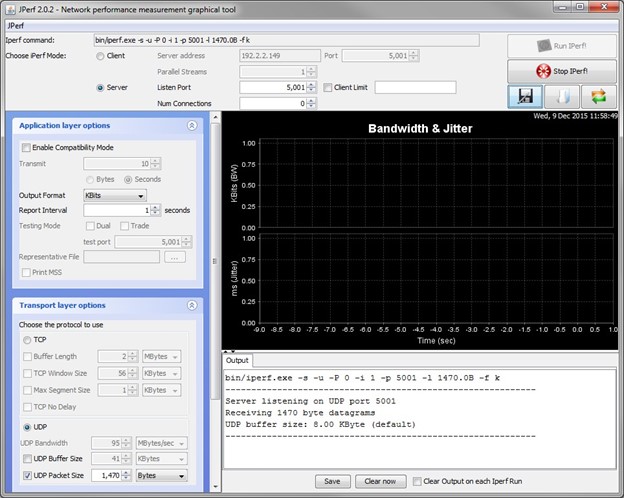
Running the UDP transmission test.

Now, from the NetX Duo Iperf Demonstration web page, select the Start UDP Transmit Test button to initiate the test. You should now observe performance statistics in the Jperf IDE and the NetX Duo web page updated, as shown below.
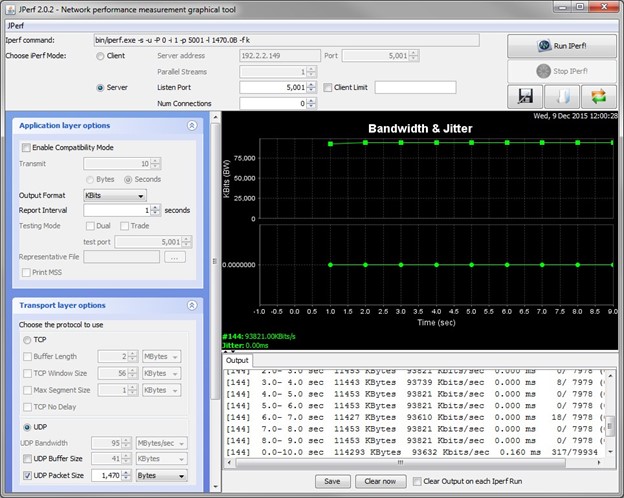
UDP transmission test stats.

To complete the test, select here link on the NetX Duo Iperf Demonstration web page. You should now observe the performance results of the test. In this example, the UDP transmission performance on the NetX Duo target to the Iperf host was 94Mbps on the NetX Duo target, as shown below.
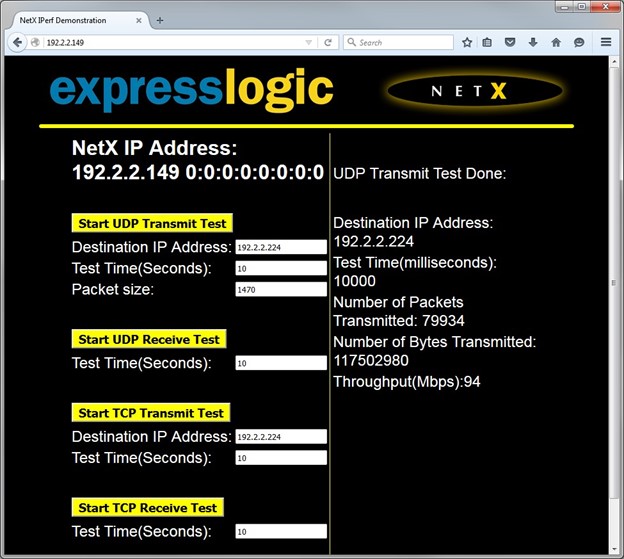
UDP transmission test results.

Running the UDP Receive Test

The UDP Receive Test determines the performance of NetX Duo UDP reception on the NetX Duo target. In this test, the NetX Duo target is the server and the Jperf host is the client. First, select Client and UDP in the Jperf IDE. Next, select Start UDP Receive Test on the NetX Duo Iperf Demonstration web page, as shown in the following illustration.
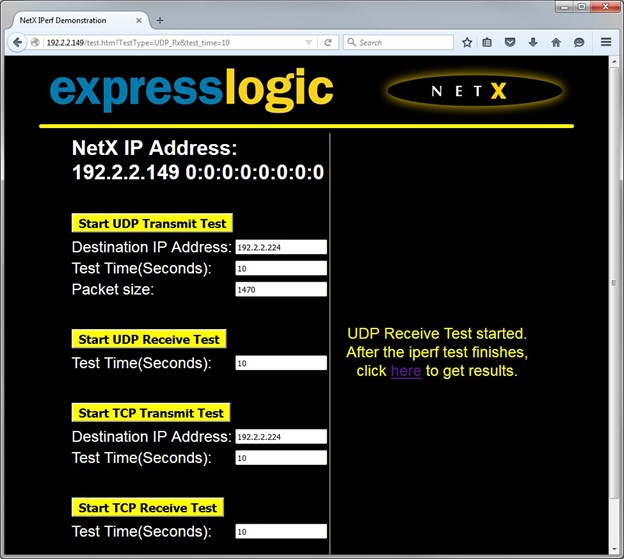
Running the UDP receive test.

Now select Run IPerf! from the Jperf IDE and observe statistics in the Jperf IDE, as shown below.
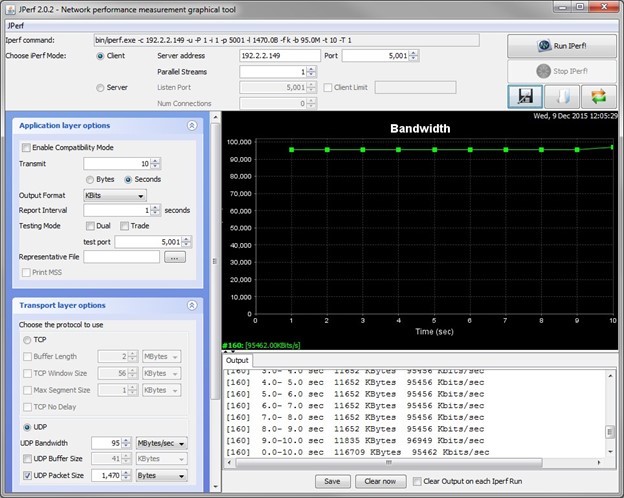
UDP receive test stats.

To complete the test, select the here link on the NetX Duo Iperf Demonstration web page. You should now observe the performance results of the test. In this example, the UDP reception performance on the NetX Duo target was 95Mbps, as shown below.
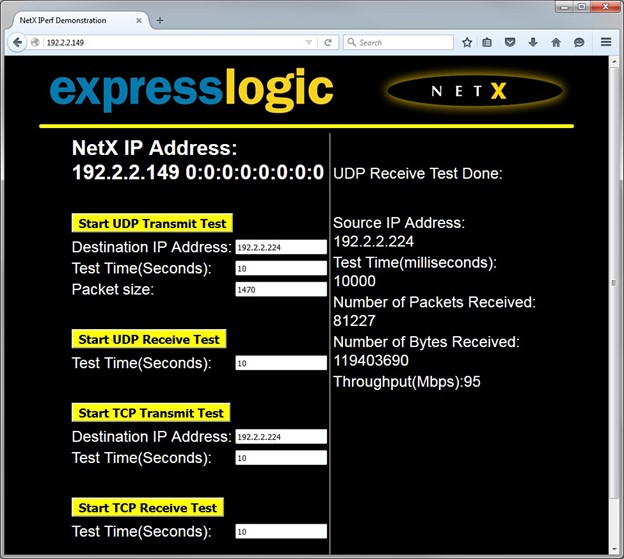
UDP receive test results

Running the TCP Transmit Test

The TCP Transmit Test determines the performance of NetX Duo TCP transmission to the host. In this test, the NetX Duo target is the client and the Jperf host is the server. First, select Server and TCP in the Jperf IDE. Next, select Run IPerf! to initiate the Iperf server, as shown below.
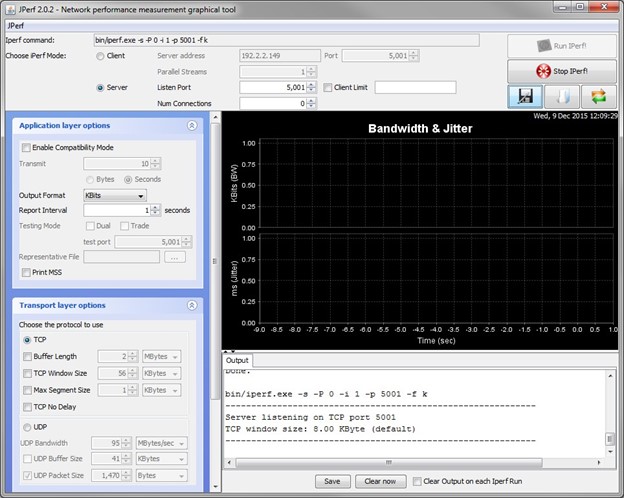
Running the TCP transmit test.

Now, from the NetX Duo Iperf Demonstration web page, select the Start TCP Transmit Test button to initiate the test. You should now observe performance statistics in the Jperf IDE and the NetX Duo Iperf Demonstration web page updated, as shown below.
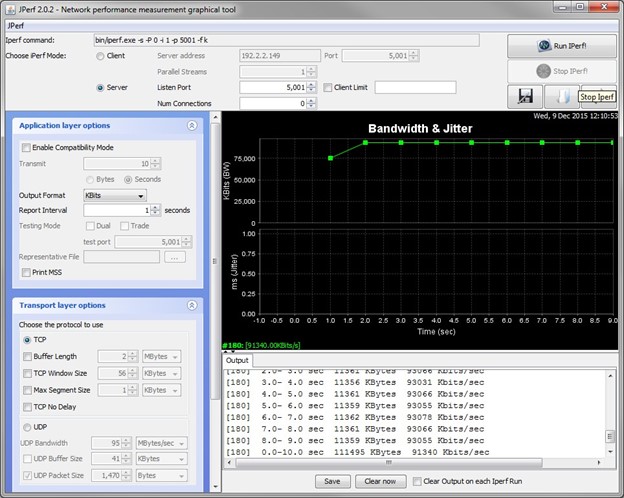
TCP transmit test stats.

To complete the test, select the here link on the NetX Duo Iperf Demonstration web page. You should now observe the performance results of the test. In this example, the TCP transmission performance on the NetX Duo target was 91Mbps, as shown below.
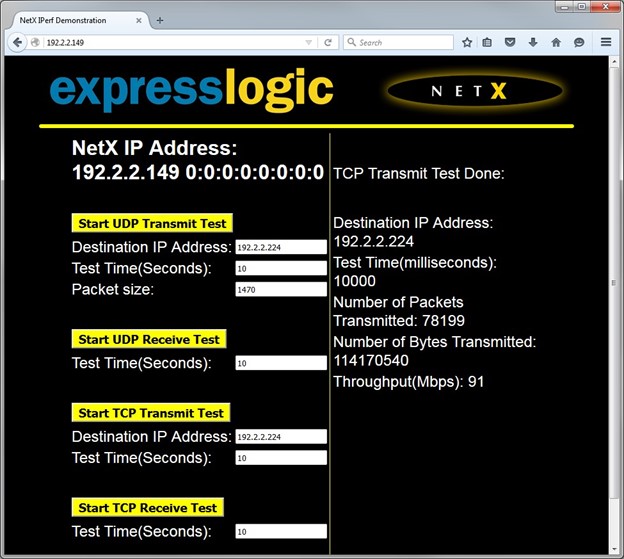
TCP transmit test results.

Running the TCP Receive Test

The TCP Receive Test determines the performance of NetX Duo TCP reception on the NetX Duo target. In this test, the NetX Duo target is the server and the Jperf host is the client. First, select Client and TCP in the Jperf IDE. Next, select Start TCP Receive Test on the NetX Duo web page, as shown.
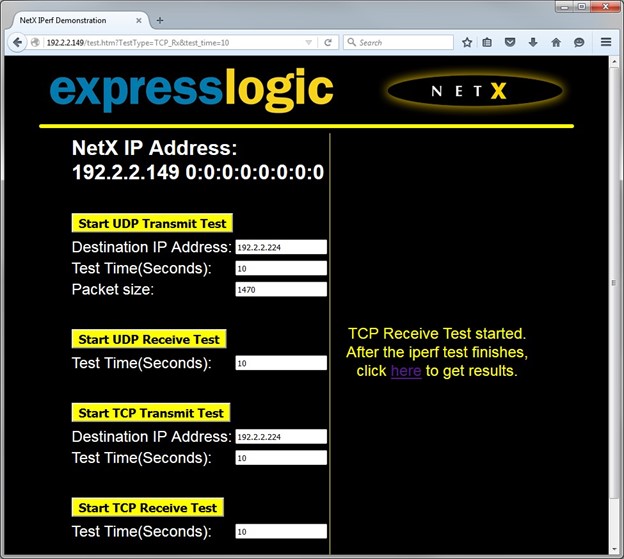
Running the TCP receive test

Now select Run IPerf! from the Jperf IDE and observe statistics in the Jperf IDE, as shown below.
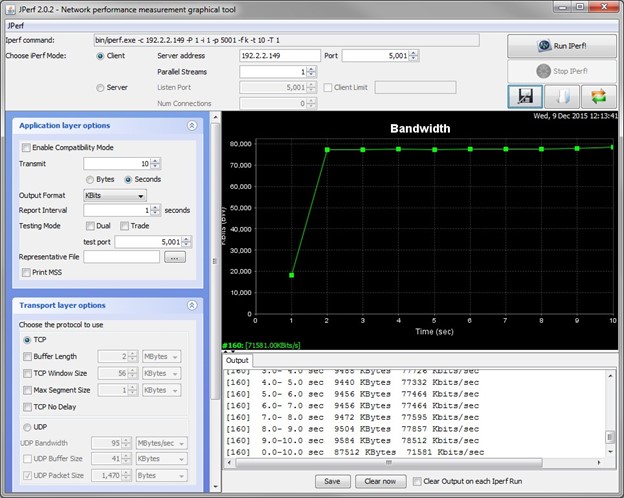
TCP receive test statistics.

To complete the test, select the here link on the NetX Duo Iperf Demonstration web page. You should now observe the performance results of the test. In this example, the TCP reception performance on the NetX Duo target was 71Mbps, as shown below.
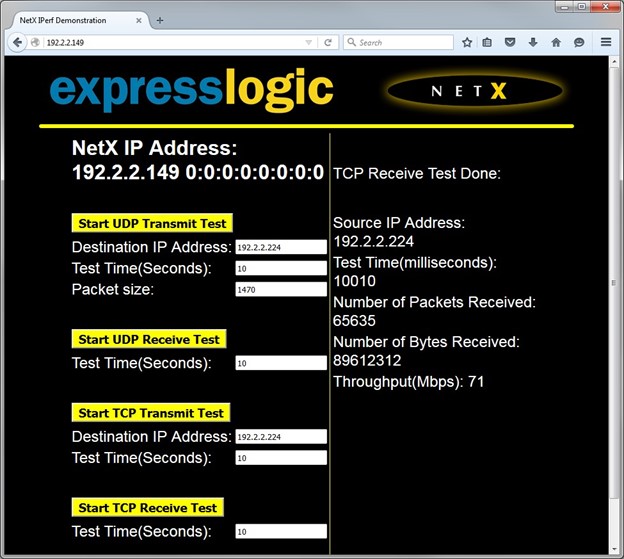
TCP receive test results.

Prev
Chapter 2 - Installing and using NetX Duo Iperf